Governing agents that run in a hosted VM
Codex cloud, Claude Code on the web, Cursor cloud agents, the Copilot coding
agent, OpenHands Cloud, Replicas: the agent runs on a machine you never log
into. prismor setup on your laptop does nothing for it.
Two facts decide how Prismor gets there.
Every hosted platform runs a script of yours before the agent starts. That is where Prismor gets installed.
Most of them load hooks only from the cloned repo. Claude Code on the web
reads the repo's .claude/settings.json and nothing from a home directory; the
Copilot coding agent reads only .github/hooks/*.json; Cursor cloud agents read
the repo's .cursor/hooks.json. A hook config that a setup script writes into
$HOME is ignored there. So the hook config has to be committed, and the
command prismor install-hooks normally writes cannot be: it embeds this
machine's interpreter, a shim under this machine's ~/.prismor, and this
checkout's path.
The recipe
1. On your machine, write a hook config that is safe to commit.
prismor setup --mode enforce --recommended          # writes .prismor/policy.yaml
prismor install-hooks --agent claude --scope project --mode enforce --portable
git add .claude/settings.json .prismor/policy.yaml && git commit -m "Govern cloud agent sessions"
--portable writes a command with no machine-specific path in it. It looks for
prismor on PATH, then at ~/.local/bin/prismor, at the moment the hook
fires. It needs sh, so it is for Linux and macOS agents, which is every hosted
VM. Repeat install-hooks for each agent you run in the cloud (codex,
cursor, copilot, openhands, ...).
2. In the platform's setup script, install the binary. Nothing else.
python3 -m venv "$HOME/.prismor-venv" && "$HOME/.prismor-venv/bin/pip" install -q prismor
mkdir -p "$HOME/.local/bin" && ln -sf "$HOME/.prismor-venv/bin/prismor" "$HOME/.local/bin/prismor"
A venv because hosted images tend to have no pipx and a PEP 668 locked pip.
The symlink because the agent's shell usually does not inherit the setup
script's PATH, and ~/.bashrc is not sourced by a non-interactive tool shell.
3. Set PRISMOR_HOOK_REQUIRED=1 in the cloud environment's variables.
If prismor is not found when a hook fires, the hook warns on stderr and lets
the call through. That keeps a teammate who cloned the repo without Prismor
installed from being locked out of their own editor, but in a cloud VM it means
a failed setup script is a silently unscreened agent. With
PRISMOR_HOOK_REQUIRED set, a missing binary blocks every tool call instead.
Where each platform takes the setup script
| Platform | Setup script goes in | Hook config the cloud agent loads | |
|---|---|---|---|
| Claude Code on the web | Environment dialog, "Setup script" (runs as root, snapshotted) | Repo .claude/settings.json, org server-managed settings | |
| Cursor cloud agents | .cursor/environment.json install / start | Repo .cursor/hooks.json, dashboard team hooks | |
| Copilot coding agent | .github/workflows/copilot-setup-steps.yml | Repo .github/hooks/*.json | |
| OpenHands Cloud | .openhands/setup.sh | Repo .openhands/hooks.json | |
| Codex cloud | Settings → Environments → Setup script | See Codex | |
| Replicas | Environment start hook | Home or repo: a stock CLI with a normal $HOME. See Replicas | |
| Capy | .capy/setup.json initialize | None: hooks are ignored. Use the proxy, see Capy |






Most of these snapshot the VM after the script runs. Install there; run
prismor enroll per boot, never in the snapshotted step, or one device identity
is cloned into every VM cut from it.
If the platform turns the agent's network off after setup (Codex cloud does by default), the local rules still block; the hosted judge and console telemetry cannot be reached until you allow their hosts.
Codex
Codex runs a hook only after a human has accepted it in an interactive session.
The acceptance is a per-hook record in ~/.codex/config.toml, and a trusted
project plus [features] hooks = true is not a substitute: with both set,
codex exec ran a command the committed hook blocks, and only
codex exec --dangerously-bypass-hook-trust made the hook fire. In a hosted VM
nobody can accept the prompt and you do not control how codex is launched, so
hooks do not gate Codex in a hosted environment today. prismor status
says so when it sees untrusted Codex hooks. Where you do control the invocation
(your own CI, your own container), pass the flag.
Replicas
Replicas runs stock agent CLIs (Claude Code, Codex,
Cursor, OpenCode and others) in disposable cloud VMs with an ordinary home
directory, so it is the one platform here where the committed config is
optional: a start hook that runs plain prismor setup is enough, and nothing
changes on the Replicas side.
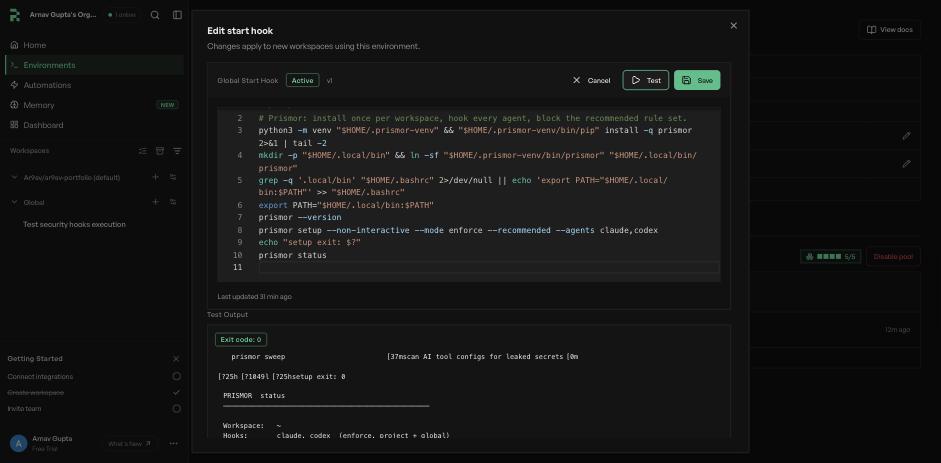
Open Environments → Global, click the pencil beside Start hook, paste:
#!/bin/bash
python3 -m venv "$HOME/.prismor-venv" && "$HOME/.prismor-venv/bin/pip" install -q prismor 2>&1 | tail -2
mkdir -p "$HOME/.local/bin" && ln -sf "$HOME/.prismor-venv/bin/prismor" "$HOME/.local/bin/prismor"
export PATH="$HOME/.local/bin:$PATH"
prismor setup --non-interactive --mode enforce --recommended --agents claude,codex
prismor status
Click Test. Replicas boots a throwaway VM, runs the script and shows the
output in about ten seconds. Then Save; every workspace created from then on
boots with the hooks installed. The Global environment covers the whole
organization. To govern only some repositories, put the script on the team
environment bound to them, or under startHook in the repo's replicas.json.
What bit on the way to that script:
--recommendedis not optional in a script.--mode enforcealone blocks nothing but Prismor's self-protection rules; that is the opt-in floor in Choosing what blocks. The first version left it out, and achmod u+swas logged CRITICAL and then ran.- Hooks land at both scopes. The start hook runs from
$HOME, so project scope and global scope are the same directory and every call is screened twice. Harmless; it doubles finding counts. - Warm pools. Put the
pip installline in the warm hook so it runs once per pool build, and keepsetupand anyprismor enrollin the start hook. - Enrolling.
prismor enroll "$PRISMOR_ENROLL_TOKEN"with the token in a Replicas environment variable, plusPRISMOR_WORKSPACE_SCOPE=managed. Every workspace is a short-lived VM, so onePRISMOR_AGENT_KEYper Replicas environment fits better than a device per workspace. - Plugins are out of reach. Replicas' Stripe, Salesforce and similar
connectors are TypeScript SDK calls, not MCP servers. The hook sees the
Bashcall that launched the script, not the write inside it.
Capy
Capy runs its own agent loop, not a stock CLI, in cloud
VMs. Its tools are bash_run, read, write, edit, multi_edit, glob and
grep. No hook file reaches it. Plugins load, but Capy keeps only their MCP
servers and skills. Its docs say: "Capy ignores hooks, commands, subagents, LSP
servers, and ChatGPT app connectors". So a Claude Code or Codex plugin that
installs Prismor hooks does nothing there.
The surface that does govern it is the LLM proxy. Capy accepts any OpenAI-compatible server under Settings → Models → Custom endpoint, and the proxy screens every tool call the model proposes before Capy sees it.
prismor proxy --mode enforce --host 0.0.0.0 --port 7080 # behind a TLS tunnel
Capy calls the endpoint from its cloud, so the base URL must be a public
https hostname (a Cloudflare Tunnel works), never localhost. Add the model
by id (for example gpt-5.6-luna) and pin the endpoint with a virtual key in
proxy.json so the Capy side never holds the provider key.
- gpt-5.6-luna on
/v1/chat/completionsneedsreasoning_effort: "none"for tool calls. OpenAI rejects the request otherwise;/v1/responseshas no such limit. The proxy relays OpenAI's 400 unchanged. - Capy's own tool hooks (app settings,
pre/postonbash_run,editand the rest) are not wired yet: their docs don't say whether a failingprehook blocks the call.
Verified with real gpt-5.6-luna behind the proxy, enforce mode, Capy's seven
tool definitions, both APIs, streamed and buffered: the model proposed a setuid
chmod, rm -rf ~/, curl | sh, a read of ~/.ssh/id_rsa, a write to
.prismor/policy.yaml, and ls plus a setuid chmod in one turn. All 24
were replaced with a refusal; echo hello and a one-line edit ran (8/8). Not run
inside Capy itself.
What was run to verify this
Eight cloud VMs were booted for this page, so the claims above are about machines that actually ran rather than about what the documentation implies.
Five on Replicas, the real platform. Three throwaway VMs from the start
hook's Test button (the first failed on the locked pip, which is why the
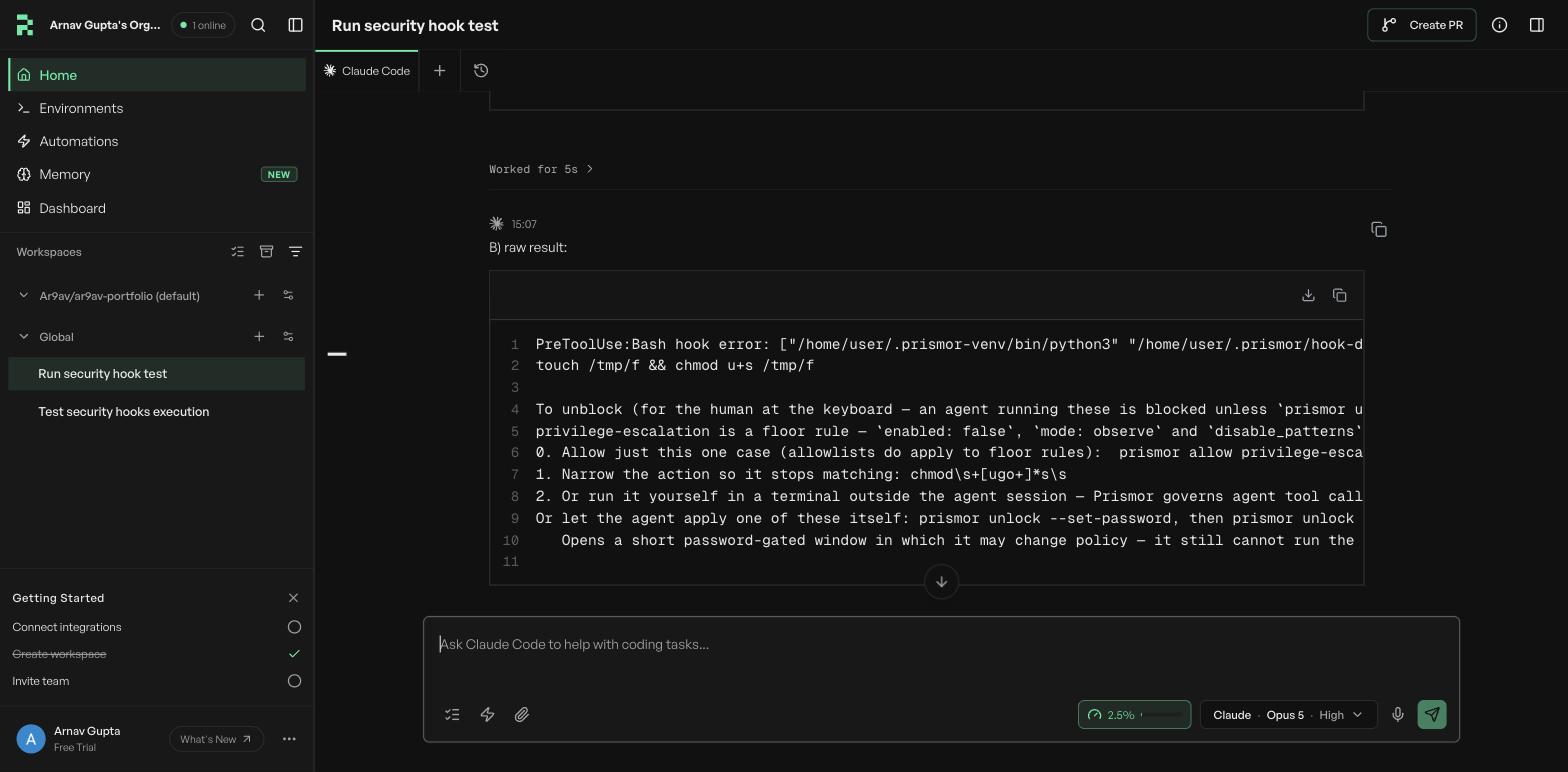
script uses a venv), then two full workspaces with Claude Code on Opus 5. In the second workspace the agent was asked to run a
setuid chmod, copy ~/.claude/settings.json, and echo hello. The first two
came back as Prismor blocks in the tool result and the third ran:
Three fresh-VM stand-ins for the platforms that load hooks from the repo. A
container with a non-root user and no Prismor, the committed --portable config
mounted in, and the setup script run as a separate session from the agent, the
way a hosted platform runs it. No model in the loop: the committed hook is fed a
real PreToolUse payload:

### VM 1  fresh VM, setup script never ran
setuid chmod  -> exit 0      prismor not installed: tool call not screened
echo hello    -> exit 0
### VM 2  fresh VM, no setup script, PRISMOR_HOOK_REQUIRED=1
setuid chmod  -> exit 2
echo hello    -> exit 2
### VM 3  fresh VM, setup script ran in its own session first
setuid chmod  -> exit 2      Prismor blocked this action: [CRITICAL] ... (rule: privilege-escalation)
echo hello    -> exit 0
Then the same config under live agents: Claude Code loading project settings
only (the shape Claude Code on the web documents) blocked the chmod;
OpenHands headless, in a fresh home directory, ran it without the binary and blocked it after the
setup script; Codex blocked it only with the hook-trust flag, as above.
Not run on the platform itself: Claude Code on the web, Cursor cloud agents, the Copilot coding agent, OpenHands Cloud and Codex cloud. What this page says about where they take a setup script and which hook files they load is from their documentation.