Egress allowlist and access requests
An agent that can reach any host can send your code or secrets to any host. This guide limits where agents on your devices may connect, starting in observe so nothing breaks. Developers can then ask for a new host from their terminal, and an admin approves it in one click.
You'll need
- An admin role in the console and at least one enrolled device.
prismoron that device.
1. Turn on egress in a policy
In the console, open Policies, select the policy attached to your org, and under Network egress click Edit.
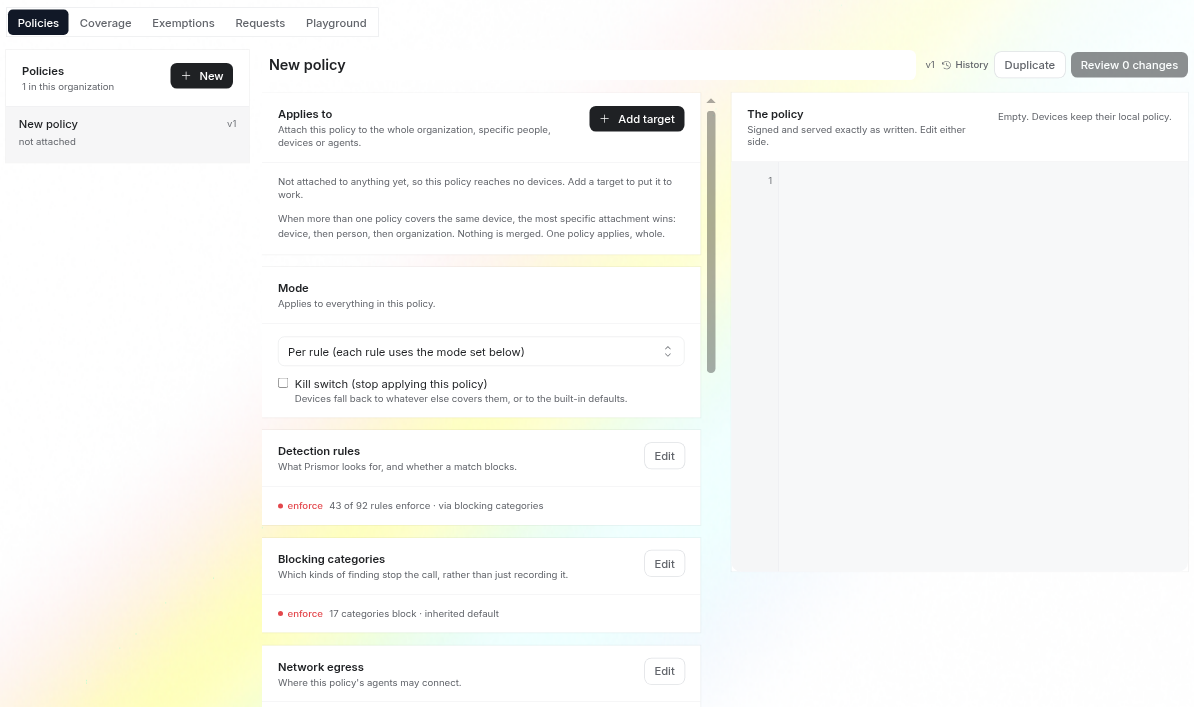
Check Applies to first. A policy that says Not attached to anything yet reaches no devices, so its egress rules never ship. Click Add target and attach it to the whole organization, or start with one device to try it out.
- Observe logs off-policy destinations without blocking. Start here.
- When nothing matches: Deny (strict allowlist) means only listed hosts are on-policy. Allow (denylist only) permits everything except what you deny.
- Add a destination for each host your agents legitimately need: a hostname, a wildcard (
*.github.com), an IP or a CIDR. Ports and a reason are optional. Deny always beats allow.
Private destinations (loopback, RFC 1918, .internal) are skipped by default. Cloud metadata endpoints such as 169.254.169.254 are always screened.
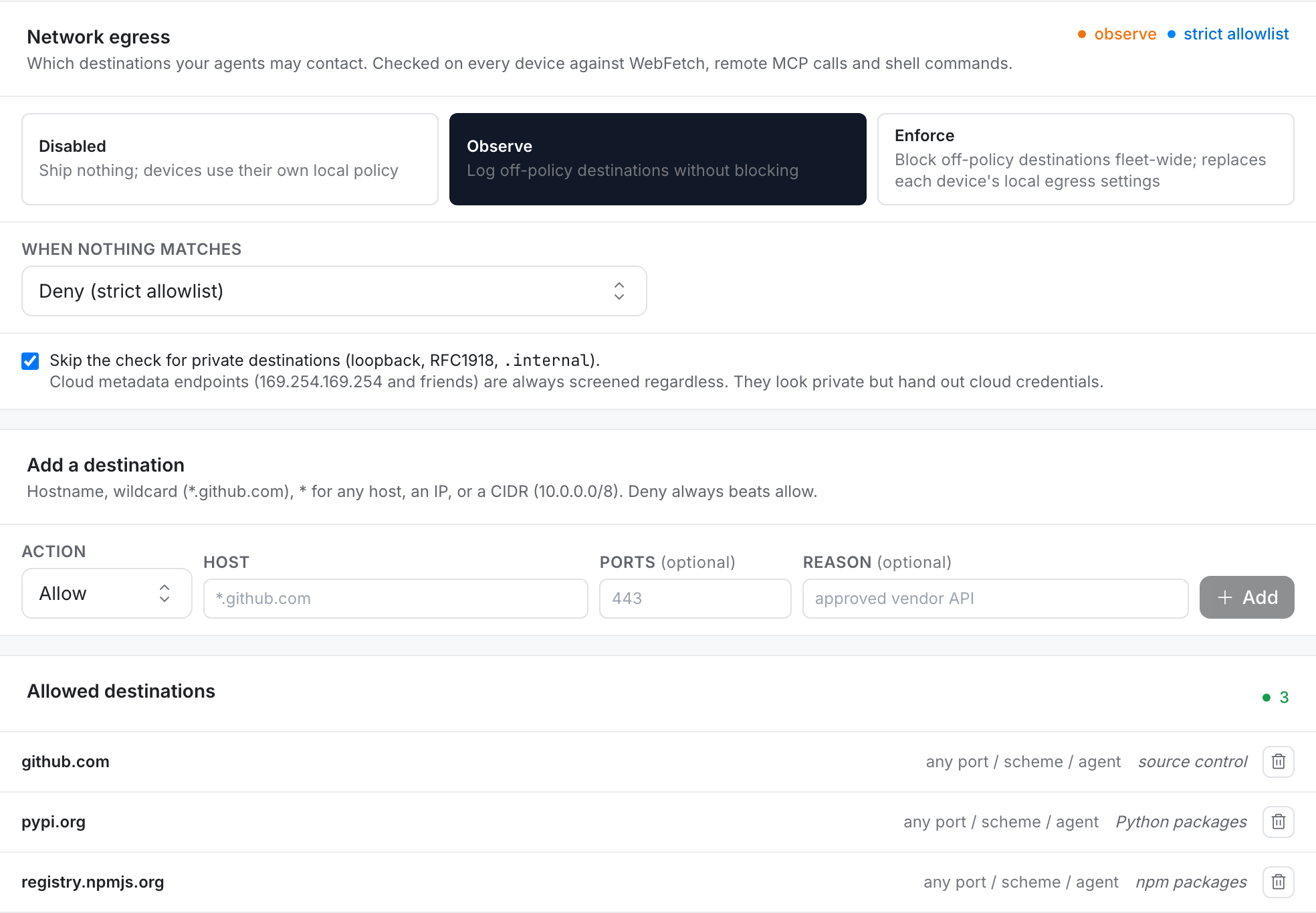
Click Done, then Review changes and Publish. The check runs on every device, against WebFetch, remote MCP calls and shell commands.
Once the org ships an egress policy, it replaces each device's local egress settings. prismor egress allow in a repo has no effect on an enrolled, org-managed workspace. That's deliberate, so a repo can't quietly widen the org's allowlist.
2. Check what a device sees
On the device, prismor egress show prints the effective policy and where it came from. prismor egress test dry-runs a host, URL or whole shell command:
prismor egress show
prismor egress test "curl -s https://api.weather.gov/points/39.7,-104.9"
source: remote — org-signed, authoritative confirms the console policy is in charge. In observe, an off-list host comes back WARN: the call goes through and gets recorded. In enforce it is blocked.
To build the list from real traffic instead of guessing, run prismor egress report. It lists the destinations recent sessions actually contacted, with the verdict each would get today.
3. Ask for a new host
When an agent needs a host that isn't on the list, the developer asks for it from the same terminal. A reason is required, so the admin can judge the request:
prismor egress request api.weather.gov --reason "forecast data for the weather app"
Requested access to api.weather.gov.
  reason: forecast data for the weather app
  → It is waiting for an org admin in the Prismor console (Policy → Requests).
    Once approved it reaches this device within ~30s; until then the block stays.
  track it:   https://www.prismor.dev/dashboard?tab=mypolicy#access-requests
The developer can follow the request's status at the track it link without admin access.
4. Approve it in the console
The request lands in Policies → Requests, with who asked, why, and which policy approving will change.

- Approve adds the exact host to that policy's allowlist and ships a signed new version.
- Approve as *.weather.gov allows the whole domain, for services that spread across subdomains.
- Deny asks for an optional note to send back.
About 30 seconds later the device has the new allowlist:
5. Switch to enforce
When observe has been quiet for a while (no WARNs you didn't expect), open Network egress again, select Enforce, and publish. Off-list destinations are now blocked on every attached device, and the request flow above is how developers get new hosts added.
The console won't let you enforce Deny with an empty allowlist without confirming first. That combination blocks every outbound call on every device.
Troubleshooting
| Symptom | Fix |
|---|---|
prismor egress allow seems to do nothing | The org ships an egress policy, and it replaces local settings. Ask for the host with prismor egress request instead. |
egress show says source: local | The device hasn't pulled the org policy yet, or the policy isn't attached to it. Check Applies to and prismor enroll-status. |
| A request was approved but the host is still WARN | Devices pull within about 30 seconds. Run prismor enroll-status and compare the policy version with the console. |
prismor egress request says the machine isn't enrolled | Requests go to your org's admins, so the device has to be enrolled. Without an org, use prismor egress allow <host> locally. |
Next
- Network Isolation: raw-IP blocking, tunnel detection, and the full egress policy reference
- Write a custom rule
- All guides