Use a hosted MCP endpoint from Claude Code
A hosted MCP endpoint is one URL, run by Prismor on AWS Lambda, that fronts the MCP servers in your registry. You paste it into Claude Code, or any MCP client on any machine, and there's nothing to install: no npx, no local gateway, and no server secrets on the laptop. Every tool call goes through Prismor first, is checked against your org's policy, and shows up in the console. Revoking the endpoint cuts every client off at once. Takes about five minutes.
This guide puts the Cloudflare Docs, Microsoft Learn and Git servers behind one endpoint, connects Claude Code to it, has Claude research Cloudflare Cron Triggers and write a Worker, and then revokes the endpoint.
You'll need
- OWNER or ADMIN role in a Prismor org on the Team or Enterprise plan. On any plan you can run the same gateway locally instead (Put every MCP server behind one gateway).
- Claude Code on any machine. Prismor doesn't need to be installed there.
1. Check the servers in your registry
Open MCP Hub. Your registry lists the MCP servers your org has registered. A hosted endpoint can front any of them:
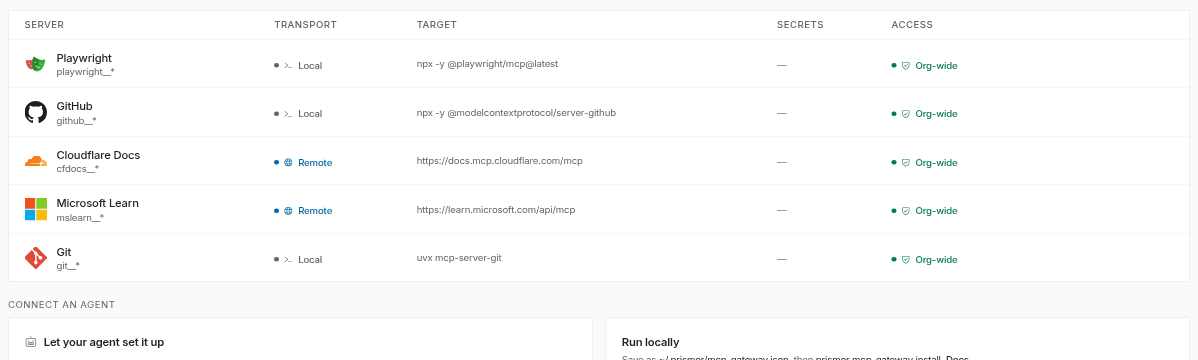
- Remote servers (an HTTPS URL, like Cloudflare Docs) are called from Prismor's side, so nothing runs on the laptop.
- Local servers that start with
npxoruvx(like GitHub and Git) are started on Prismor's side too, inside the endpoint, not on the laptop. - Servers that drive a browser, like Playwright, need a browser to drive, so they're marked local only and can't be put behind a hosted endpoint. Run those in a local gateway.
- A server that needs a token keeps it in Secrets, encrypted server-side. The token never reaches the machine that uses the endpoint.
Add servers with Add an MCP, Recommended servers or Import .mcp.json.
2. Spin up an endpoint
Under Hosted endpoints, click Spin up MCP instance. Give it a label, then choose which registry servers it fronts. Every server that can be hosted starts selected, so click the ones to leave out; Playwright is greyed out as local only. Here the endpoint leaves out github and keeps cfdocs, mslearn and git:

Acting as is optional. Bind the endpoint to one person, and their per-user tool rules apply to every call made through it. Leave it as Shared for a team endpoint.
Click Create with 3 servers.
3. Copy the URL, once
The endpoint's URL is shown once, and it carries the endpoint's key, so anyone with it can call these tools. Store it like a password.

It comes in two forms:
-
Claude Code (selected): a ready-to-run command. Run it in your project and you're connected; there's nothing else to approve.
claude mcp add --transport http prismor https://<id>.lambda-url.<region>.on.aws/mcp/prism_agent_…Add
--scope projectto write it to the project's.mcp.jsoninstead, to share it with everyone who opens the project. -
.mcp.json (any MCP client): the same endpoint as the block every MCP client reads. Save it as
.mcp.jsonin a project. The file carries the key: keep it out of public repos and readable only by you (chmod 600 .mcp.json), since Claude Code writes it readable by everyone on the machine.{ "mcpServers": { "prismor": { "type": "http", "url": "https://<id>.lambda-url.<region>.on.aws/mcp/prism_agent_…" } } }
Then click Done, I saved it.
4. Use it from Claude Code
Check the connection first: claude mcp get prismor shows Status: ✔ Connected.
Start claude in the project. If you ran the one-liner, the prismor server is already connected. With a project .mcp.json, Claude Code asks about the new server the first time: choose Use this MCP server. The highlighted default is Continue without using this MCP server, which turns it off for this project.
Every tool behind the endpoint shows up under the one prismor server, named mcp__prismor__<server>__<tool>. Here that's mcp__prismor__cfdocs__search_cloudflare_documentation, mcp__prismor__mslearn__microsoft_docs_search, the git tools, 17 in all.
Then ask for something that needs them. Here Claude looks up how Cron Triggers work in Cloudflare's docs through the endpoint, then writes the Worker:
The docs search ran on Prismor's side, and nothing but Claude Code ran on the laptop. The result is a working Worker:
# worker/wrangler.toml
name = "cron-logger"
main = "src/index.ts"
compatibility_date = "2026-10-01"

[observability]
enabled = true

# Every 15 minutes (UTC): :00, :15, :30, :45
[triggers]
crons = [ "*/15 * * * *" ]
An endpoint that has been idle starts its servers on the first call, which takes about 10 to 15 seconds; after that, calls are answered in well under a second.
5. Watch it in the console
Back in MCP Hub → Hosted endpoints, the endpoint shows its servers, its activity and its mode:
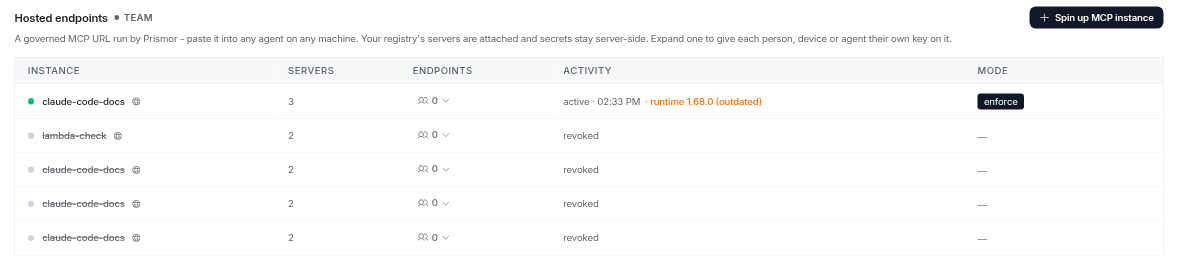
- Activity shows when the endpoint was last used and the Prismor runtime it runs. A runtime behind the current release is flagged (outdated): newer policy features and fixes don't reach that endpoint until it's updated.
- Mode is the endpoint's enforcement. Endpoints start in enforce: a call your policy denies is refused before it reaches the server, and Claude Code gets the reason back as the tool's error.
- Endpoints gives each person, device or agent their own key on this endpoint, so their calls are attributed to them and each key can be revoked on its own. Expand the row to mint one.
- Each endpoint is a service identity under Devices (named
gateway: <label>), with its sessions, tool calls and findings, and the same controls as any device: mode override, pause, blocked tools.
Tool results are screened too. A result that carries a prompt injection is withheld before the model sees it.
6. Revoke it
To cut every client off at once, open the endpoint's identity under Devices and click Revoke:
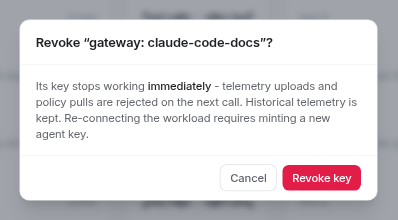
Click Revoke key. The URL stops working within a minute. Claude Code shows the prismor server as needs-auth, with no tools, and any other client gets 403 {"error":"invalid or revoked instance key"}. The endpoint's history stays in the console. To reconnect, spin up a new endpoint and hand out its URL.
Troubleshooting
| Symptom | Fix |
|---|---|
Claude Code lists no prismor tools | You chose Continue without using this MCP server. Open /mcp in Claude Code and enable prismor, or remove it from disabledMcpjsonServers in .claude/settings.local.json. |
prismor shows needs-auth | The endpoint was revoked, or the URL was mistyped. Spin up a new one. |
| An endpoint's runtime shows (outdated) | It runs an older Prismor runtime than the current release. Prismor updates hosted endpoints on its side; tell support if one stays outdated. |
| The first call after a while takes 10 to 15 seconds | The endpoint was idle and is starting its servers. Later calls are fast. |
| Spin up MCP instance asks you to upgrade | Hosted endpoints need the Team or Enterprise plan. Run the gateway locally instead (guide). |
| A tool call comes back as an error that starts with Blocked by Prismor | Your policy denied it. The message names the rule; open the endpoint's session under Devices to see the full decision. |
| A tool result comes back as response withheld | The result scanner flagged it as a possible prompt injection. Open the session to see which rule matched. |
Next
- Put every MCP server behind one gateway: the local version, on any plan
- MCP gateway reference: hosted instances, per-tool rules and the full configuration
- All guides