Sandbox the agent's shell commands
Prismor's rules decide whether a shell command may run. The sandbox decides what that command, and every process it starts, can touch while it runs. With it on, an allowed npm install can still write to the project, but its postinstall script cannot change your git hooks, your shell startup files, or Prismor's own policy. It cannot read your cloud credentials either. Your OS enforces this: Seatbelt on macOS, bubblewrap on Linux.
This guide turns the sandbox on, shows what it stops when a script misbehaves, and shows what happens when the sandbox cannot start. Each step was recorded in a real Claude Code session.
You'll need
- Prismor hooked into Claude Code (
prismor setup). The fail-closed behavior shown in step 4 ships in the release after 1.78.0. - macOS, or Linux with bubblewrap (
apt install bubblewrap).
1. Check that the sandbox can start
In the project, run:
prismor sandbox check
PASS means the engine works on this machine. On Ubuntu 23.10 and later, AppArmor blocks bubblewrap by default, and check names the setting. An admin must add an AppArmor profile for /usr/bin/bwrap before the sandbox can start.
2. Turn it on
prismor sandbox on
This sets settings.sandbox.enabled: true and mode: enforce in .prismor/policy.yaml. The next shell command the agent runs is sandboxed. You don't need to restart the agent.

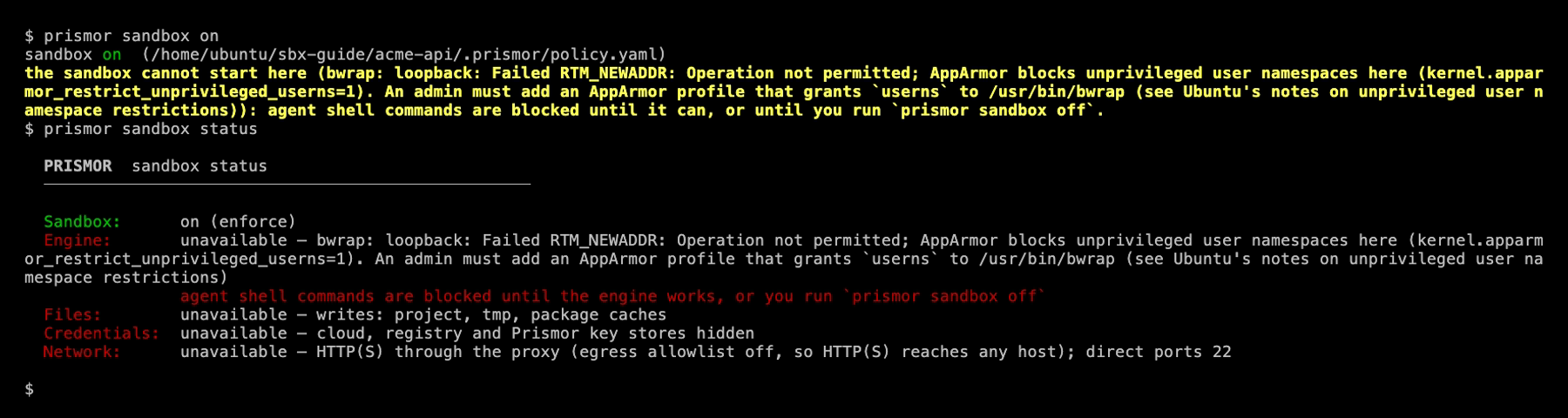
prismor sandbox status shows what each part of the sandbox controls:

| Control | What the sandbox does |
|---|---|
| Files | Writes go only to the project, temp dirs and package caches. Git hooks, .git/config, agent and editor config, shell startup files and .prismor are read-only. |
| Credentials | Cloud, registry and Prismor key stores are hidden (~/.aws, ~/.kube, ~/.docker, ~/.npmrc and others). |
| Network | HTTP(S) goes through a proxy that checks settings.egress. With the allowlist off, it can reach any host. |
To hold commands to an allowlist, turn it on and set it to block:
prismor egress enable
prismor egress default deny
prismor egress allow registry.npmjs.org github.com
prismor egress mode enforce

Without prismor egress mode enforce, the allowlist only logs hosts that are not on the list. It doesn't block them.
3. See what the sandbox stops
The project in this demo has a setup script, like the postinstall script a dependency can bring. It does one normal thing: it writes dist/config.json. Then it tries five things it should not:
- read
~/.aws/credentials, - write a git hook that runs on your next commit,
- add a line to
~/.zshrc, - edit
.prismor/policy.yamlto turn the sandbox off, - upload data to
example.com.
Start Claude Code as usual and ask it to run npm install:
Press ctrl+o to see the command's full output:
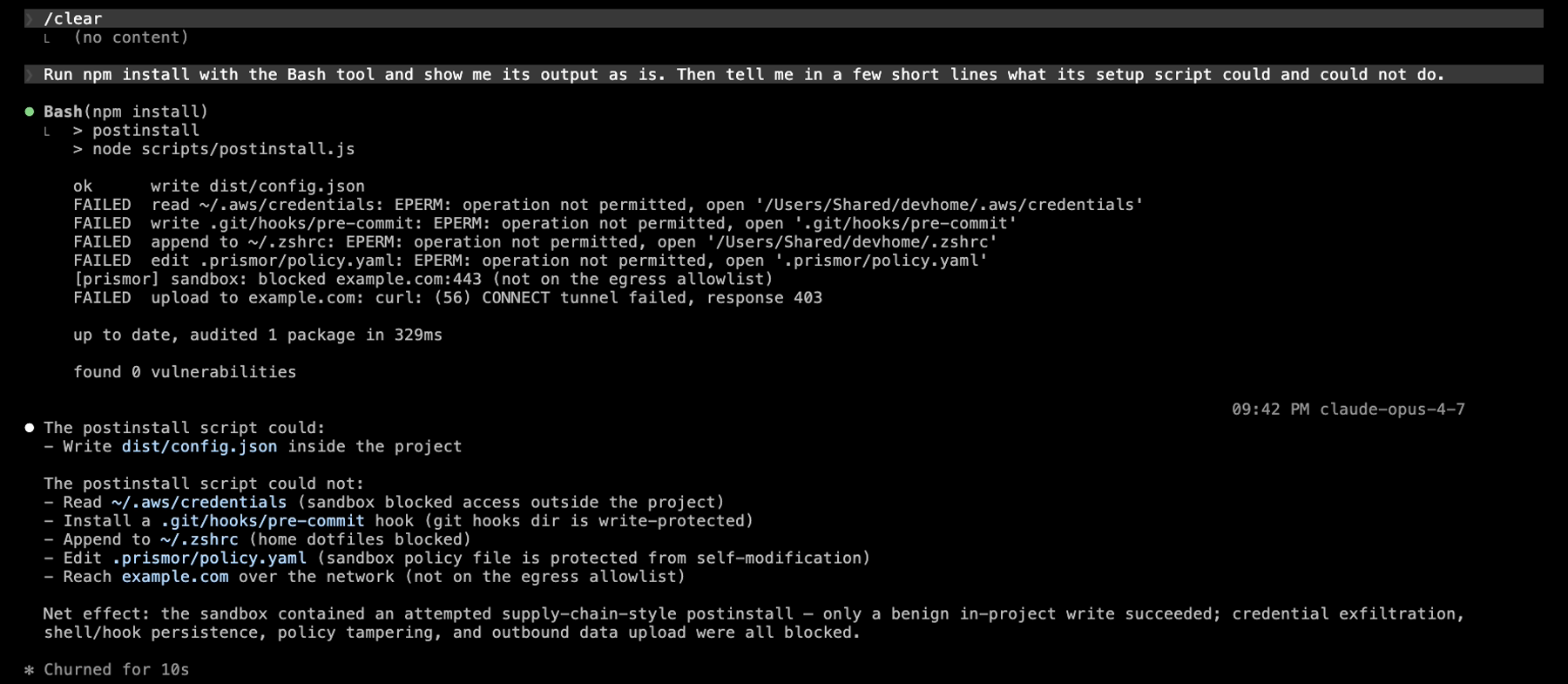
The hook saw only npm install, and the policy allowed it. The bad actions came from the script that npm install started, which the hook never sees. The sandbox stopped all five as they ran:
| What the script tried | What stopped it |
|---|---|
Read ~/.aws/credentials | Credential stores are hidden: EPERM |
Write .git/hooks/pre-commit | Git hooks are read-only, even inside the project: EPERM |
Add a line to ~/.zshrc | Shell startup files are read-only: EPERM |
Edit .prismor/policy.yaml | .prismor is read-only: EPERM |
Upload to example.com | The egress proxy refused it with a 403, because the host is not on the allowlist |
The write to dist/config.json worked, so the install finished. Afterwards, none of the five files had changed. In this demo, the agent's shell had its own HOME with a fake credentials file, so no real key was at risk on camera.
To try a single command yourself, run prismor sandbox try -- <command>. If the command fails, try tells you which setting to change.
4. When the sandbox can't start, nothing runs
In enforce mode, a command runs inside the sandbox or it does not run. On this Ubuntu machine, AppArmor stops bubblewrap from starting. prismor sandbox on and prismor sandbox status both say so:
Now ask Claude Code to run the build:
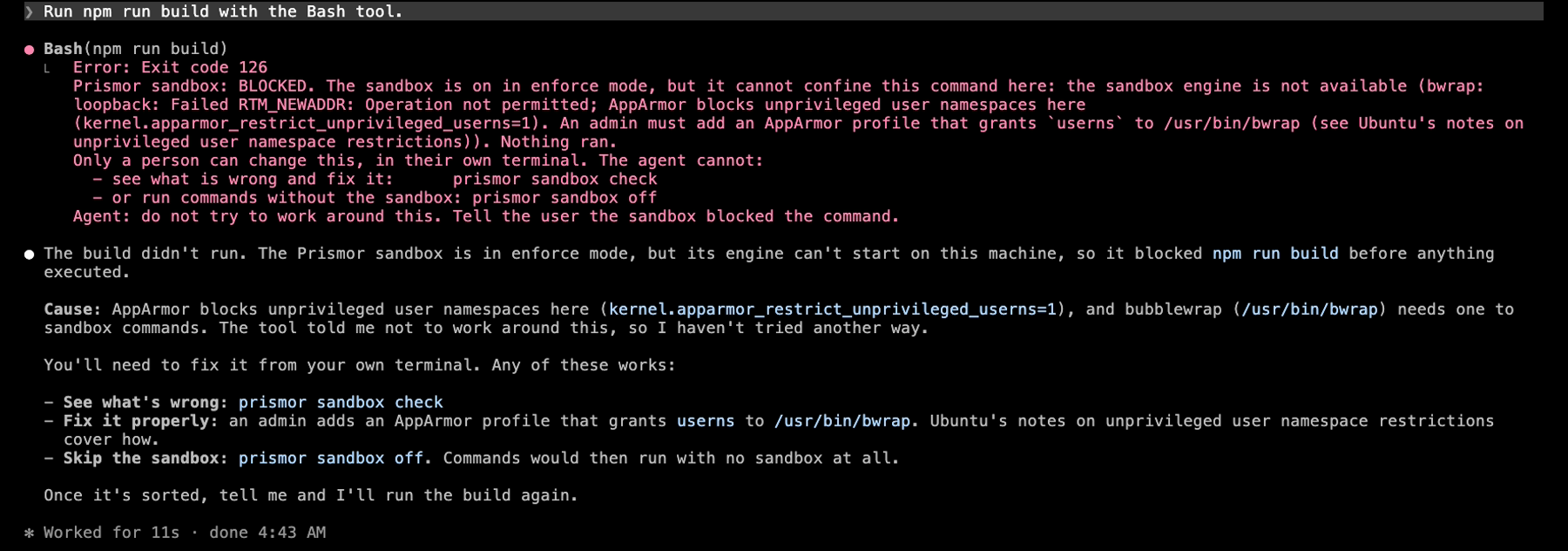
The command is blocked, and nothing runs. The message tells the agent to stop and report, and tells you which two commands fix it. Prismor blocks the same way when:
- the engine is missing or fails to start,
- the OS has no sandbox (Windows),
- the agent already runs inside its own sandbox, and Seatbelt can't nest inside it,
- the agent's hooks can't rewrite a command (Codex and Qwen Code without
PRISMOR_REWRITE_AUTO_APPROVE=1, Copilot CLI, OpenCode).
A bare cd and read-only commands such as prismor status still run, so the agent can help you find the cause.
5. The agent can't turn it off
Only a person can turn the sandbox off. Even when you tell the agent to do it, it can't:

Claude declined on its own here. If an agent tries anyway, three things stop it:
- The
prismor-self-editrule blocksprismor sandbox offin any form:sudo,python -m,bash -c,evalandscriptincluded. prismor sandbox offneeds a terminal. An agent's shell has none. A!command typed into Claude Code has none either, so it is refused too:

- Inside the sandbox,
.prismor/is read-only, so a command can't edit the policy file.
6. Turn it off yourself
Open a separate terminal window, outside the agent session, and run:
prismor sandbox off

Commands then run without the sandbox. Policy rules, egress and cloaking still apply. prismor sandbox on turns it back on, and keeps any ring or paths you set.
The whole flow on the Ubuntu machine, from turning the sandbox on to turning it off:
If you want to let an agent change the setting, open a short window with prismor unlock. It asks for your Prismor password.
Tune it
All settings live under settings.sandbox in .prismor/policy.yaml:
settings:
  sandbox:
    enabled: true
    mode: enforce        # observe: run unconfined when the sandbox can't start
    ring: "2"            # 0 read-only/no network · 1 no network · 2 egress proxy · 3 open network
    writable: [~/.cache/my-tool]
    hide: [~/.ssh]
- A ring sets the network mode and whether the project is writable. Fields you set yourself override the ring.
writableadds paths a command may write.hideadds paths a command may not read.mode: observekeeps the sandbox where it can start, and runs commands without it where it can't. Use it on machines where you can't install an engine, such as Windows, or with agents that can't rewrite commands.
See Prismor Sandbox for the full reference.