Stop secret leaks
Cloak keeps secret values out of the model's context. But an agent can move a secret without ever seeing it: it can archive your .env, build it into a Docker image, or print a token that a CLI keeps on disk. Prismor stops these leaks too. In this guide you give Claude Code two everyday requests, watch Prismor stop the leak in each one, and check the credential rules from the terminal. It takes about five minutes.
You'll need
prismor1.80.1 or later, with Claude Code on the same machine.- A project with a
.env. The project in this guide has a Stripe key, an OpenAI key and a database URL. All three are fake.
1. Turn on the guards
From the project directory:
prismor install-hooks --agent claude --mode enforce
prismor cloak install
prismor cloak add --env-file .env
You don't have to configure anything else. The guards come with the default policy and with cloak install. When every entry in a .env is in the vault, the strictest guard applies to that file. That guard is shown in step 2.
2. A vaulted .env can be shown, not moved
Cloak removes vaulted values from what a command prints. That is the only place it can remove them. If a command writes the file to an archive, a copy, a pipe or a script, the real values go with it.
Here the developer asks for something ordinary: "I'm setting up the staging box. Can you bundle the .env and docker-compose.yml into a tarball I can scp over?"
Prismor blocked the agent twice: once when it tried to print .env, and once when it tried to put .env in the tarball. The agent then made a tarball with docker-compose.yml and a .env.template that has the key names and placeholders, not values. It told the developer how to get the real values onto staging. No archive with a secret in it was made.
Prismor still lets the agent read the file in ways that only print:
grep -c KEY .env                          # allowed
sed 's/=.*/=<set>/' .env                  # allowed: names only
tar czf env-backup.tgz .env               # blocked
cp .env backup.txt                        # blocked
python3 -c "print(open('.env').read())"   # blocked
To use a key in a command, the agent uses its placeholder, @@SECRET:STRIPE_SECRET_KEY@@. Prismor puts the real value in when the command runs.
3. A build that would ship a secret is blocked
A Docker image, a package, a release or a git push carries files, not context. So before one of these commands runs, Prismor lists the files it would ship and checks them. It looks for an env file that has values, a value from the vault, and anything that looks like a key, inside archives too.
This project's Dockerfile runs COPY . . and the project has no .dockerignore. The developer asks: "Can you build the docker image for this and check that it starts?"
The first docker build was blocked before it ran. The agent added a .dockerignore that excludes .env, built again and started the container. Its check shows no .env in the image, the container answers on port 3000, and the keys are still set at run time through env_file in docker-compose.yml. That is the correct fix: keep .env out of the image and give the app its secrets at run time.
The same check runs for these commands:
| Command | What Prismor checks |
|---|---|
docker build, podman build | the build context, minus .dockerignore |
docker compose build, up, create or run | the build context of each service in the compose file |
npm publish, npm pack, cargo publish | the files the package would contain |
git add, git push | the files it would stage, and the commits not on a remote yet |
gh release upload, gh gist create, curl -F @file | the files it names |
4. Token stores and credential commands
CLI tools keep their tokens in files that Cloak doesn't manage, such as ~/.kube/config and ~/.config/gh/hosts.yml. Prismor's rules cover them. To see what a rule would do, run prismor check:
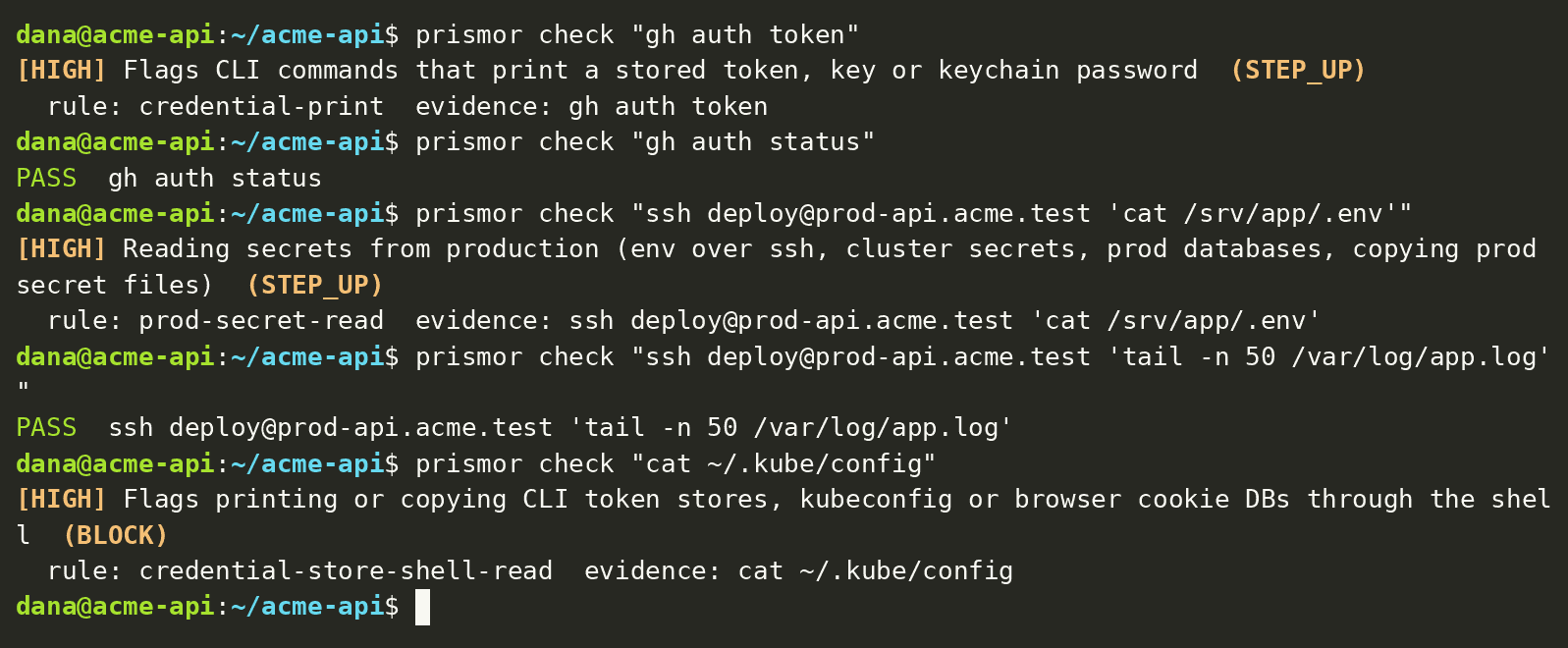
For each leak, the normal command next to it still passes:
| Leak | Result | Still passes |
|---|---|---|
cat ~/.kube/config | blocked | kubectl --kubeconfig ~/.kube/config get pods |
gh auth token | asks you | gh auth status |
aws iam create-access-key | asks you | aws sts get-caller-identity |
pbpaste | asks you | pbpaste > url.txt |
ssh prod-api 'cat /srv/app/.env' | asks you | ssh prod-api 'tail -n 50 /var/log/app.log' |
"Asks you" means Claude Code shows the call to you, and it runs only if you approve it.
Troubleshooting
| Symptom | Fix |
|---|---|
The agent can't copy or archive .env | Expected when the file is vaulted. Use the placeholder in the command, or run the copy yourself in your own terminal. |
docker build is blocked | Add the file the message names to .dockerignore, then build again. |
git add or git push is blocked | Add the env file to .gitignore. For a push, remove the value from the commit before you push. |
| A guard blocks something safe | The block message has the steps. prismor approvals approve <id> allows that one call. prismor allow <rule> --pattern '<command>' allows it every time. |
node --env-file=.env is blocked | The process would get the real values. Start the app yourself, or have the app load its env. |
Next steps
- Secret Leak Guards: every guard, its limits and how to turn one off
- Cloak your secrets: import a
.envand use placeholders - Sandbox the agent's shell commands: stop the scripts a command starts, which the hooks don't see