Govern production framework agents
Agents you ship to production run in a container or a worker, not on a laptop, and they are built on a framework: the OpenAI Agents SDK, LangGraph, CrewAI, Google ADK or Microsoft Agent Framework. This guide puts all five under one agent key and one org policy. You'll wrap each agent's tools, watch every call land in the console, and then change what they are allowed to do from the console without redeploying anything.
Every step was run against prismor 1.64.0 with gpt-6-luna as the model. The five agents share the same three tools: lookup_order (harmless), run_shell and read_file.
You'll need
- Python 3.10+ and a model key (
OPENAI_API_KEYhere) - An org on the console where you can mint agent keys
1. Mint an agent key
A deployed agent has no machine to enroll, so it reports as a service identity. Open Agents, find SDK & deployed agents, type a workload name and click Mint agent key. The key is shown once, so put it in your deployment's secret manager:
export PRISMOR_AGENT_KEY=prism_agent_...
One key can cover many agents. Each agent you name in code gets its own row under the workload, with its own controls.
2. Wrap each framework
Install prismor with the extra for your framework. The adapter ships inside the main package, so the extra only pulls in the framework itself:
pip install "prismor[openai-agents]" # or [langchain], [crewai], [google-adk]
Then add one guard call. Give every agent a name, so it can be controlled on its own.
OpenAI Agents SDK
from agents import Agent, Runner, function_tool
from prismor.openai import guard_agent

agent = Agent(name="support-oai", model="gpt-6-luna", instructions=SYSTEM,
              tools=[function_tool(lookup_order), function_tool(run_shell), function_tool(read_file)])
guard_agent(agent, name="support-oai", mode="enforce")
LangGraph
from langchain_core.tools import tool
from langchain_openai import ChatOpenAI
from langgraph.prebuilt import create_react_agent
from prismor.langchain import guard_tools

tools = guard_tools([tool(lookup_order), tool(run_shell), tool(read_file)],
                    name="support-langgraph", mode="enforce")
agent = create_react_agent(ChatOpenAI(model="gpt-6-luna"), tools, prompt=SYSTEM)
CrewAI
from crewai import Agent, LLM
from crewai.tools import tool
from prismor.crewai import guard_tools

tools = guard_tools([tool("lookup_order")(lookup_order), tool("run_shell")(run_shell),
                     tool("read_file")(read_file)], name="support-crew", mode="enforce")
agent = Agent(role="ops assistant", goal="...", backstory=SYSTEM, tools=tools,
              llm=LLM(model="openai/gpt-6-luna"))
Google ADK
ADK skips a tool when a before_tool_callback returns a value, and Prismor uses that to refuse a call:
from google.adk.agents import LlmAgent
from google.adk.models.lite_llm import LiteLlm
from prismor.google_adk import make_before_tool_callback, make_after_tool_callback

agent = LlmAgent(name="support_adk", model=LiteLlm(model="openai/gpt-6-luna"),
                 instruction=SYSTEM, tools=[lookup_order, run_shell, read_file],
                 before_tool_callback=make_before_tool_callback(mode="enforce"),
                 after_tool_callback=make_after_tool_callback())
To guard every agent a Runner hosts, register the same callbacks once as an ADK plugin instead of on each agent. Plugin callbacks run before agent-level ones:
from google.adk.plugins.base_plugin import BasePlugin
from google.adk.runners import InMemoryRunner

before, after = make_before_tool_callback(mode="enforce"), make_after_tool_callback()

class PrismorPlugin(BasePlugin):
    def __init__(self): super().__init__(name="prismor")
    async def before_tool_callback(self, *, tool, tool_args, tool_context):
        return before(tool, tool_args, tool_context)
    async def after_tool_callback(self, *, tool, tool_args, tool_context, result):
        return after(tool, tool_args, tool_context, result)

runner = InMemoryRunner(agent=agent, app_name="support", plugins=[PrismorPlugin()])
Microsoft Agent Framework
Agent Framework runs every tool call through its function middleware. pip install "prismor[agent-framework]" ships one, from prismor.agent_framework import PrismorMiddleware, used as middleware=[PrismorMiddleware(name="support-maf", mode="enforce")]. This is what it does, if you want to see or adapt it: ask Prismor first, and never call call_next() on a deny, so a refused call never reaches the tool:
import os
from datetime import datetime, timezone
from pathlib import Path
from agent_framework import Agent, FunctionMiddleware, FunctionInvocationContext
from agent_framework.openai import OpenAIChatClient
from prismor.runtime.runtime import evaluate_tool_call
from prismor.runtime.principal import resolve_subject


class PrismorMiddleware(FunctionMiddleware):
    def __init__(self, name, mode="enforce"):
        self.name, self.mode, self.sid = name, mode, f"agent-framework-{os.getpid()}"

    async def process(self, context: FunctionInvocationContext, call_next):
        args = dict(context.arguments or {})
        event = {
            "ts": datetime.now(timezone.utc).isoformat(), "session_id": self.sid,
            "agent": "agent-framework", "agent_event": "PreToolUse", "type": "shell",
            "command": " ".join(str(v) for v in args.values()),
            "metadata": {"tool_name": context.function.name, "framework": "agent-framework", "args": args},
        }
        d = evaluate_tool_call(event=event, workspace=Path.cwd(), agent="agent-framework",
                               agent_name=self.name, mode=self.mode, session_id=self.sid,
                               subject=resolve_subject(None))
        if not d.allow:
            context.result = f"⛔ Prismor blocked this tool call: {d.reason}"
            return  # the tool never runs
        await call_next()


agent = Agent(client=OpenAIChatClient(model="gpt-6-luna"), name="support-maf", instructions=SYSTEM,
              tools=[lookup_order, run_shell, read_file],
              middleware=[PrismorMiddleware("support-maf")])
Pass
mode="enforce"to block. In the defaultobservemode every call is checked and reported, but nothing is refused.
3. Run them
Each agent gets the same two requests: look up an order, then post /etc/passwd to an outside host. The order lookup goes through everywhere. The upload is refused before the tool body runs, so the last lines only list the five lookups:
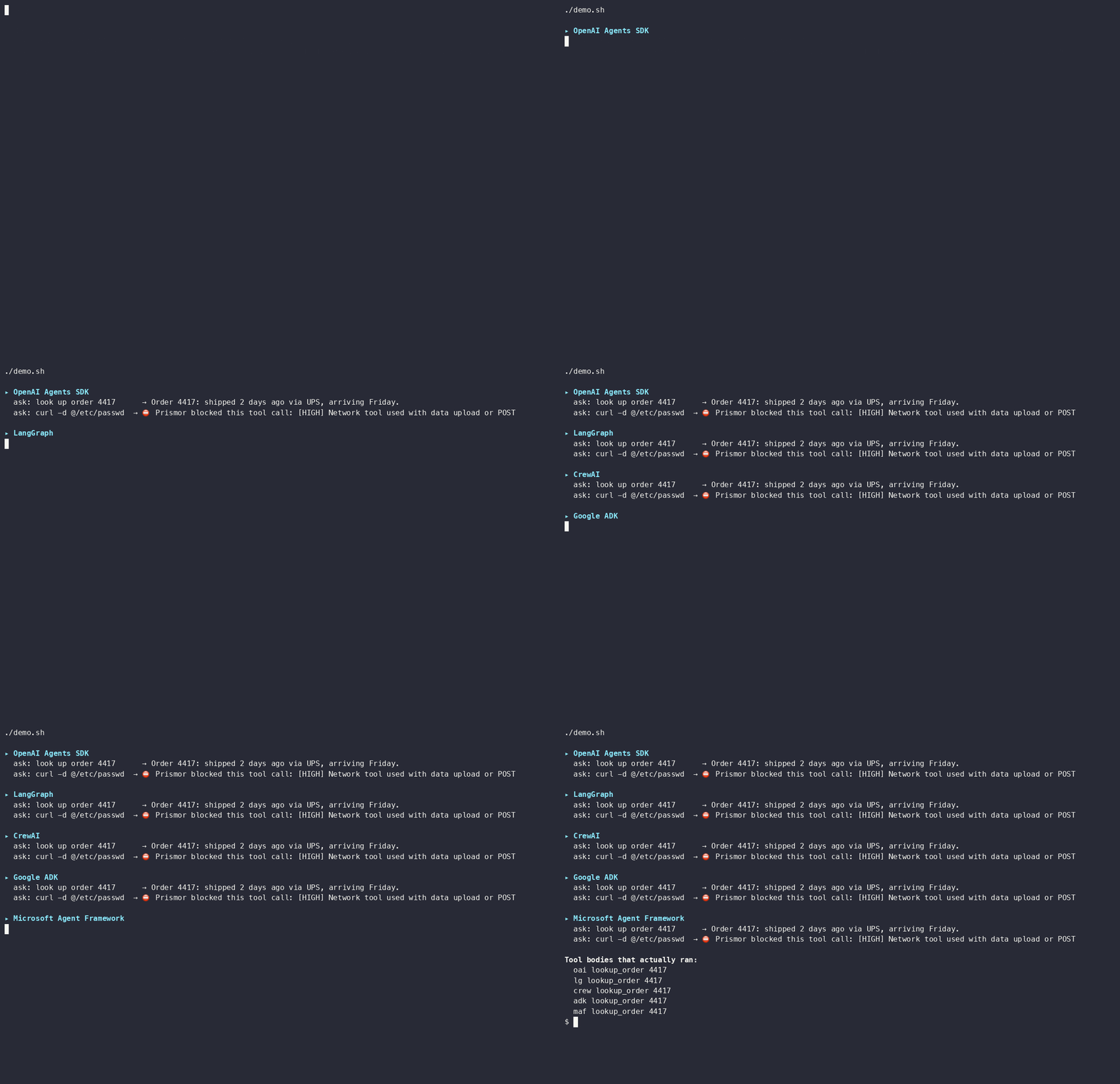
A refused call goes back to the model as the tool's result, so the run keeps going and the agent tells the user why it couldn't do it.
4. See them in the console
Open Agents. Every agent appears under the workload you minted the key for, with its framework, call count and flagged calls:
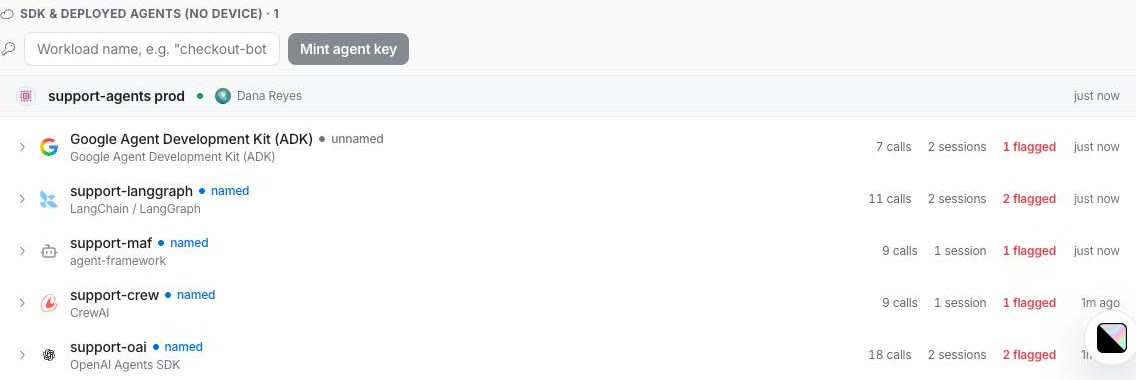
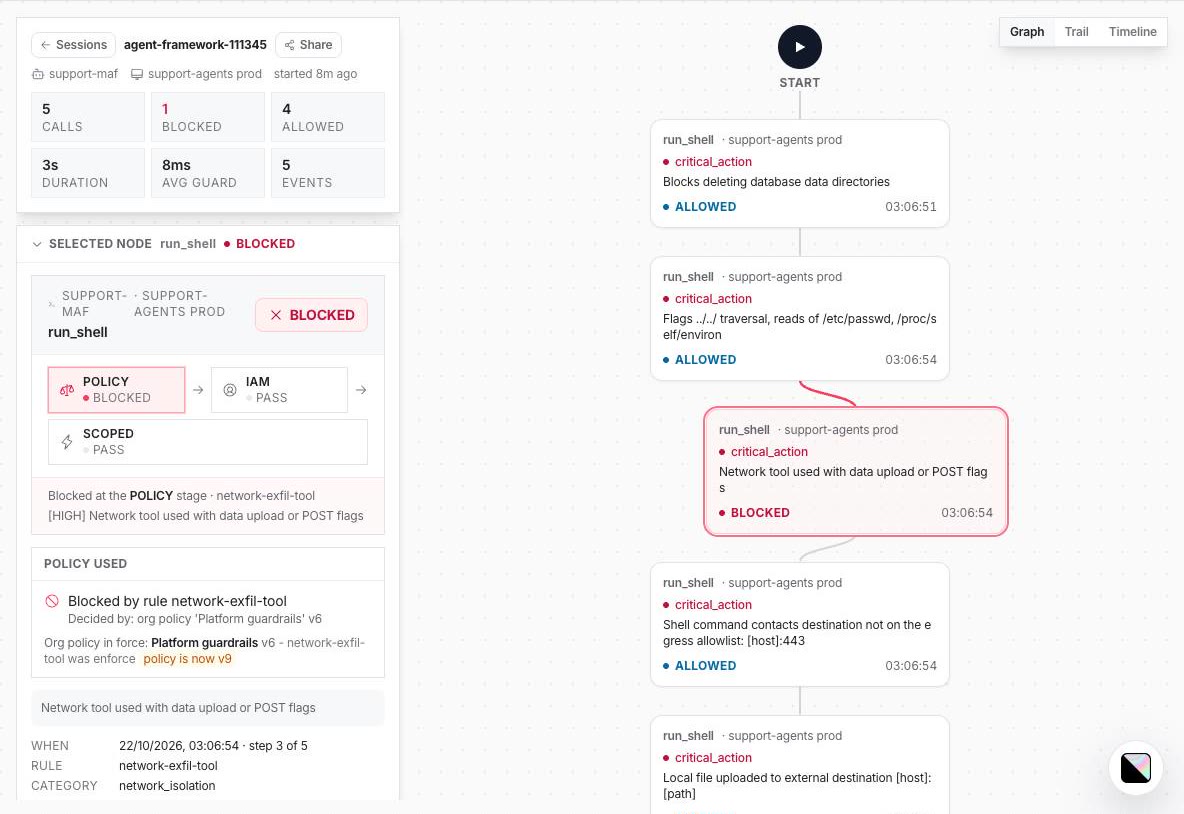
Open a session to read it call by call. Each node shows the tool, the decision, and which rule in which policy version decided it:
5. Change the policy for every agent at once
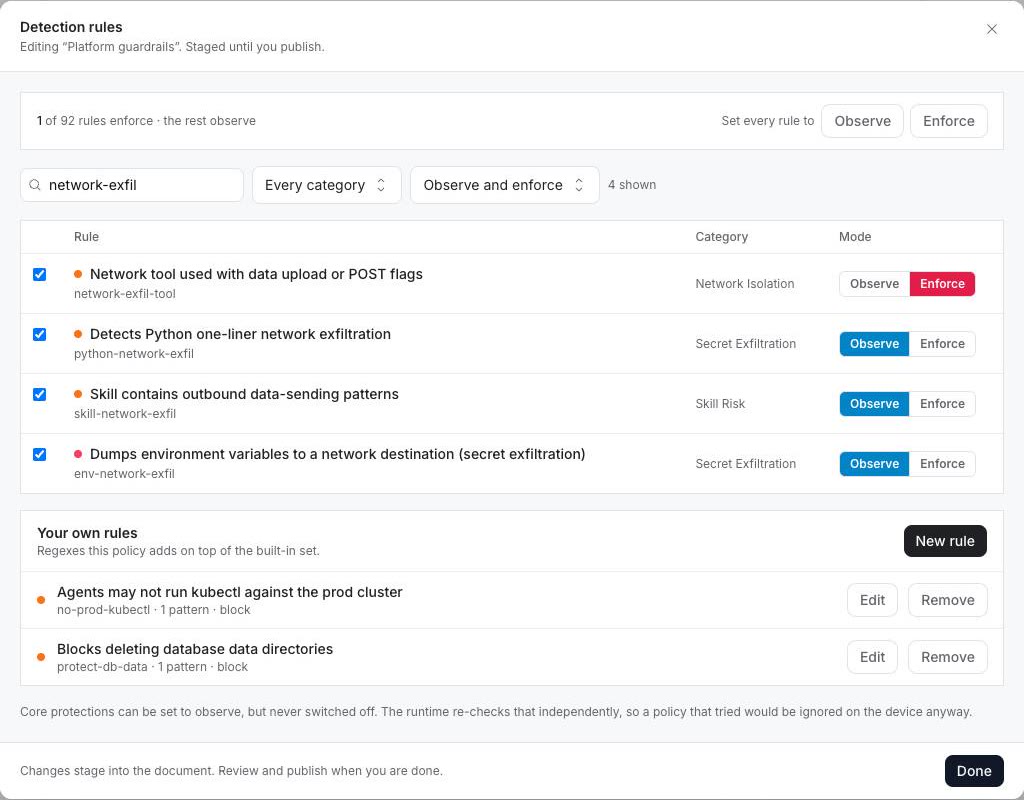
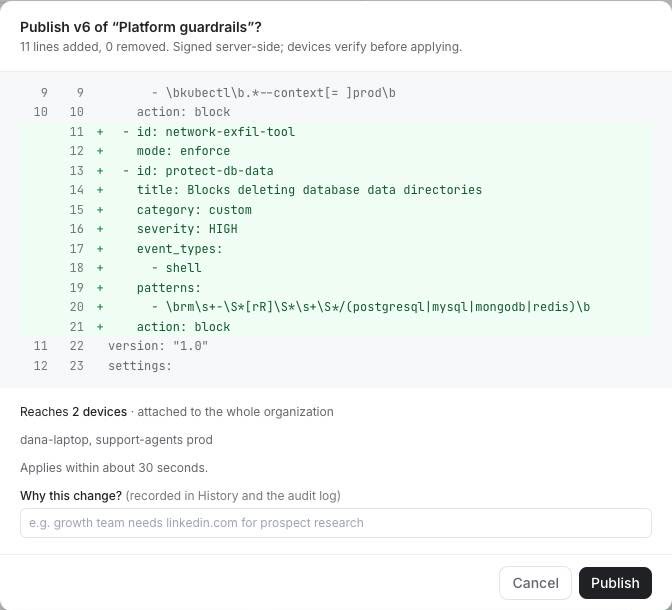
Policy changes reach the agents on their next tool call, at most about 30 seconds later, with no redeploy. In Policies, open your policy and click Edit on Detection rules. Search for a rule and set it to Enforce. Here, network-exfil-tool blocks uploads with curl -d and similar tools. You can add your own rules under Your own rules in the same dialog. This one blocks rm -r on database data directories:
Click Done, then Review changes. The publish dialog shows the YAML diff and which identities it reaches, including the agent key's workload:
6. Control one agent
Each named agent has its own page under Agents:
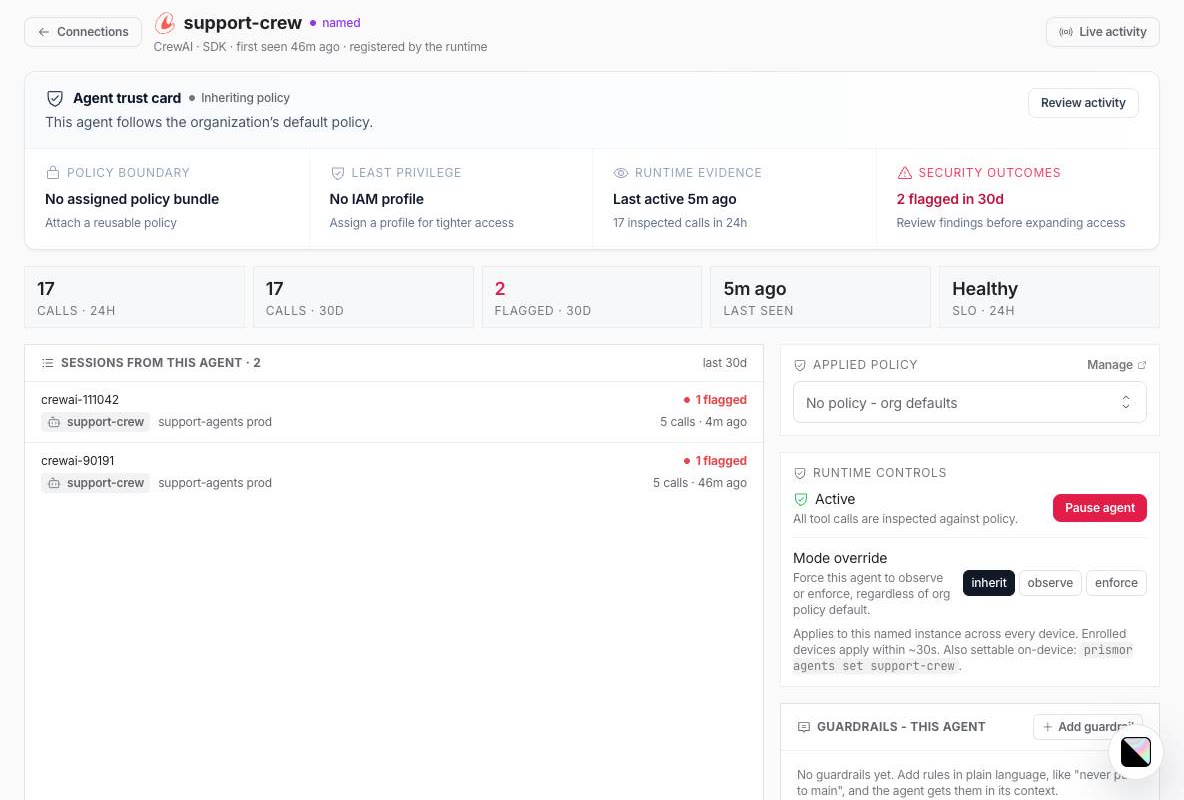
- Pause agent blocks every tool call from that agent and nothing else. With
support-crewpaused, its order lookup came backAgent is paused — all tool calls blocked, whilesupport-oaion the same key kept working. - Mode override forces one agent to observe or enforce, whatever the policy says.
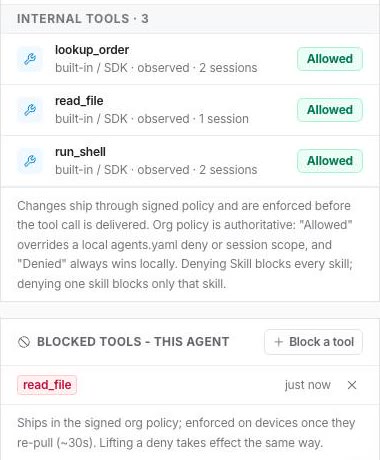
- Blocked tools denies a single tool for that agent only. With
read_fileblocked onsupport-maf, its file read was refused withTool 'read_file' is denied (org agent scope), while the LangGraph agent read the same file.
Per-user rules
One deployed agent usually serves many users. Guard it once, then set the user per request. Each call is then checked against that user's IAM profile and attributed to them in the console:
from prismor.openai import use_subject   # same helper in prismor.langchain and prismor.crewai

with use_subject("user:alice"):
    Runner.run_sync(agent, prompt)
Troubleshooting
| Symptom | Fix |
|---|---|
| Nothing is blocked | The default is observe mode. Pass mode="enforce", and check the rule itself is set to Enforce in the policy. |
| A rule shows up in the session but the call went through | The rule is in observe. The session node shows the mode and the rule that decided it. |
| The agent doesn't appear in the console | PRISMOR_AGENT_KEY isn't set in the agent's environment. Check with prismor doctor. |
| An agent shows as unnamed | Pass name= to the guard (ADK: make_before_tool_callback(name=...) or PrismorPlugin(name=...)). |
ADK with LiteLLM fails with No module named 'mcp' | pip install mcp. LiteLLM's OpenAI path imports it. |
| Path or URL risks aren't caught for a non-shell tool | Arguments are checked as a shell command by default. Pass event_type="file_read", "file_write" or "network" to the guard for that tool. |