Find shadow AI
Shadow AI is any AI tool on a developer's machine that runs outside Prismor's coverage: coding agents with no hooks, MCP servers that bypass the gateway, and provider API keys sitting in plain files. In this guide you inventory one machine, send the results to the console, and see what each finding needs to be governed. Takes about five minutes.
You'll need
prismorinstalled on the machine. Sending results to the console also needs the machine enrolled. See Enroll a device to the console.- Any AI tools on that machine. This guide's machine has Claude Code, Cursor and Codex installed, three MCP servers, and an OpenAI key in a project
.env.
1. Scan the machine
prismor discover
discover reads agent configs, MCP configs and environment variables on this machine. It changes nothing and sends nothing. It reports three inventories, then a coverage score:
- Agents: every coding agent it finds, and whether Prismor's hooks are installed in it.
- MCP servers: every server in Claude, Cursor and other IDE configs, and whether it runs behind the Prismor MCP gateway.
- Provider keys: AI provider credentials in the environment or config files, and whether Cloak manages them. Prismor records only that a key exists, its type and where it lives, never the value.
Anything present but not governed is marked SHADOW.

Pass one of agents, mcp or keys to see only that inventory, or --json for machine-readable output. In CI, --fail-on-shadow exits 1 if anything ungoverned turns up.
2. Send the inventory to the console
prismor discover --report
--report uploads the same inventory to your org and prints Reported to your organization console. at the end. You only need to run it by hand the first time: enrolled machines that run hooked agents re-report in the background about once a day.
3. Review it in the console
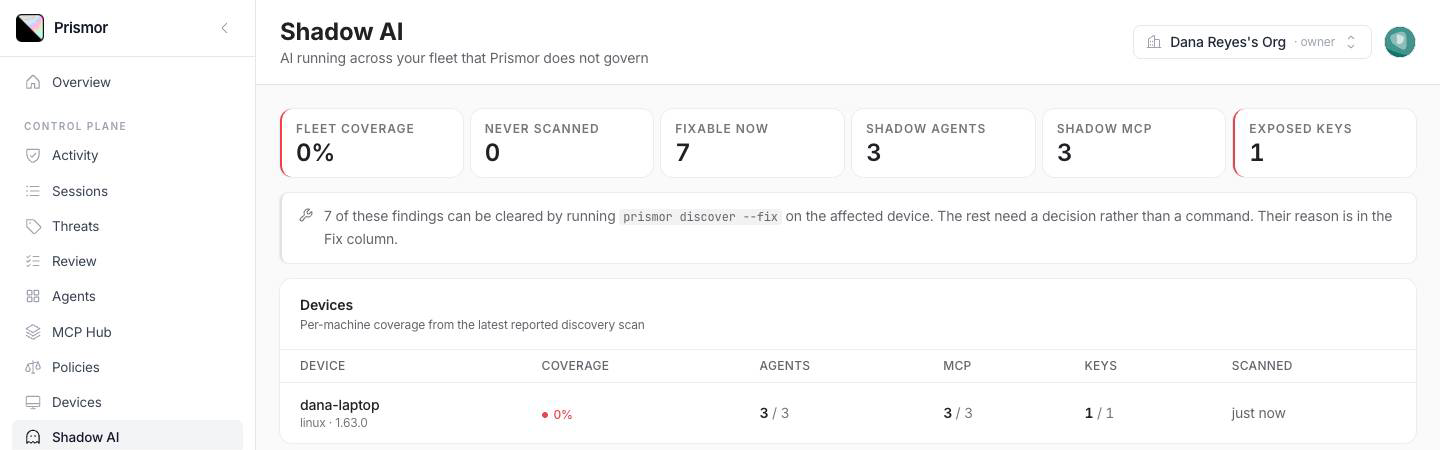
Open Shadow AI. The top row summarises the fleet: Fleet coverage, devices Never scanned, findings Fixable now, and counts of Shadow agents, Shadow MCP and Exposed keys. Below that, Devices shows coverage per machine from its latest scan.
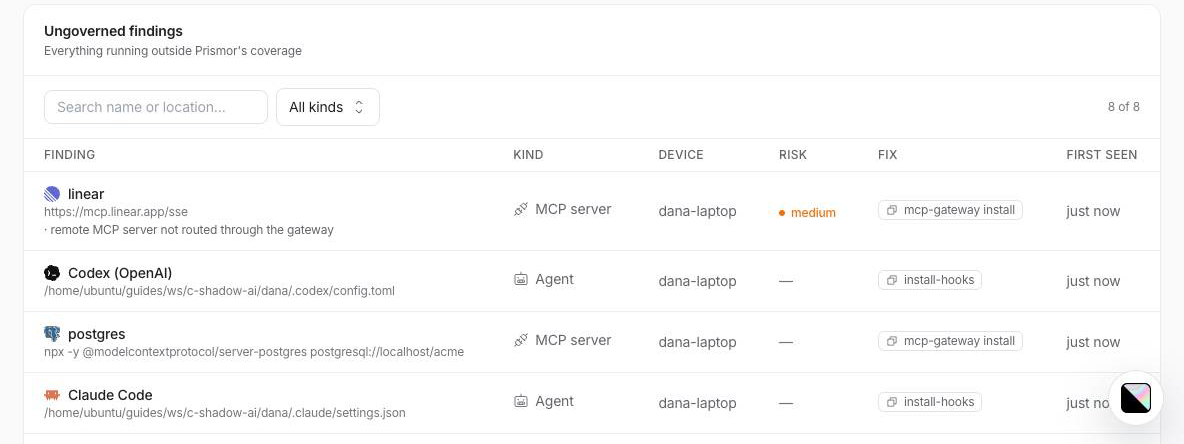
Ungoverned findings lists each item with its device, risk and fix. The Fix button copies the command that clears that finding (install-hooks, mcp-gateway install or cloak add). If there's no command, the column reads needs a decision. That happens when Prismor has no hook for an agent and an admin has to decide what to do with it.
4. Fix what can be fixed
On the affected machine, run:
prismor discover --fix
--fix lists exactly what it will change before touching anything. Unhooked agents get Prismor's global hooks, MCP servers move behind the Prismor MCP gateway, and keys in the files it found get imported into Cloak. It changes nothing until you answer y:

--yesskips the prompt for scripted rollouts.- Newly hooked agents start in observe mode. Pass
--fix-mode enforceto start them in enforce instead.
Anything under CANNOT FIX AUTOMATICALLY stays shadow until you decide what to do with it.
Run prismor discover --report again afterwards, so the console shows the new coverage straight away.
Troubleshooting
| Symptom | Fix |
|---|---|
--report says the device is not enrolled | Enroll it first: see Enroll a device to the console. |
--report says the console could not be reached | Check network access to prismor.dev and retry. The local report is still correct. |
| A device shows under Never scanned | It's enrolled but has never reported. Run prismor discover --report on it. |
| You don't want config files read for keys | --no-file-scan checks environment variables only. |
| needs a decision on an agent | Prismor has no hook for that agent, so --fix can't govern it. Remove it, or accept the risk. |
Next
- Shadow AI: what each inventory covers, and the CI gate
- Put every MCP server behind one gateway
- All guides