Write a custom rule
The built-in rules cover the generic dangers: rm -rf /, secret exfiltration, reverse shells. Your org has dangers only you know about. This guide writes one, agents may not run kubectl against the prod cluster, tests it locally, then ships it to every device from the console.
You'll need
prismorinstalled. For step 3, a device enrolled in your org.- An admin role in the console to publish policy.
1. Write the rule in your project
Rules for one repo live in .prismor/policy.yaml. prismor policy init creates a commented starter file. Add a rule with a new id:
version: "1.0"
rules:
  - id: no-prod-kubectl
    title: Agents may not run kubectl against the prod cluster
    severity: HIGH
    category: custom
    event_types: [shell]
    fields: [command]
    patterns: ['\bkubectl\b.*--context[= ]prod\b']
    action: block
    mode: enforce
patternsare Python regexes, matched case-insensitively. Any one match fires the rule. Wrap them in single quotes so YAML leaves the backslashes alone.event_types: [shell]withfields: [command]checks shell commands only.mode: enforcemakes this one rule block even while the rest of the device runs in observe. Leave it out and the rule reports what it would have blocked, without blocking.
2. Check it, then pin it with tests
prismor policy validate catches YAML and regex mistakes. prismor check runs a command through the same engine the hooks use, without running it:
prismor policy validate
prismor check "kubectl --context prod delete deploy api"
prismor check "kubectl --context staging get pods"
The prod command comes back BLOCK from no-prod-kubectl. Staging passes. (The built-in kubectl-cluster-change also warns on the delete. Rules stack.)
Then pin both behaviours in .prismor/policy-tests.yaml, so a later edit can't quietly break them:
tests:
  - name: prod kubectl is blocked
    type: command
    input: kubectl --context prod delete deploy api
    expect: block
    expect_rule: no-prod-kubectl
  - name: staging kubectl still works
    type: command
    input: kubectl --context staging get pods
    expect: pass
prismor policy test

prismor policy test exits non-zero on a failure, so it can run in CI as-is.
3. Ship it to every device from the console
A rule in one repo protects that repo. To cover the whole fleet, put it in an org policy.
In the console, open Policies, pick a policy (or click New), and under Detection rules click Edit. Scroll to Your own rules and click New rule. Fill in the same id, a description under What it catches, set When a match blocks to Block (refuse the call), keep shell selected under Which events to check, and add the pattern.
Paste a command into Try it against a sample. The pattern shows matches when it fires.
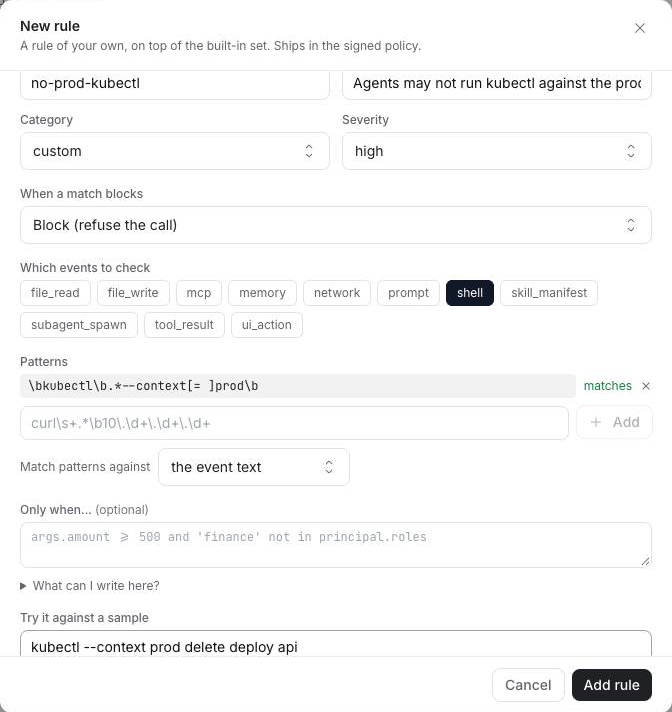
Click Add rule, then Done. The policy's YAML pane shows exactly what will be signed and served:
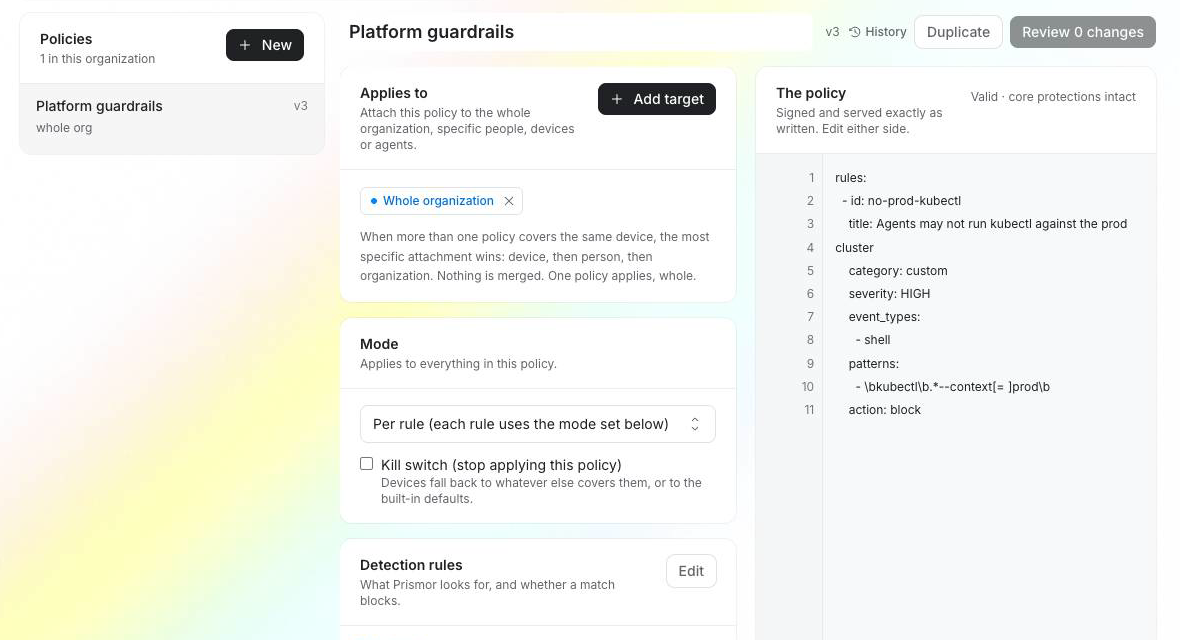
Make sure the policy is attached under Applies to (here, Whole organization), then click Review changes. The dialog shows the diff, which devices it reaches, and asks why you're changing it. That reason goes into History and the audit log. Click Publish.
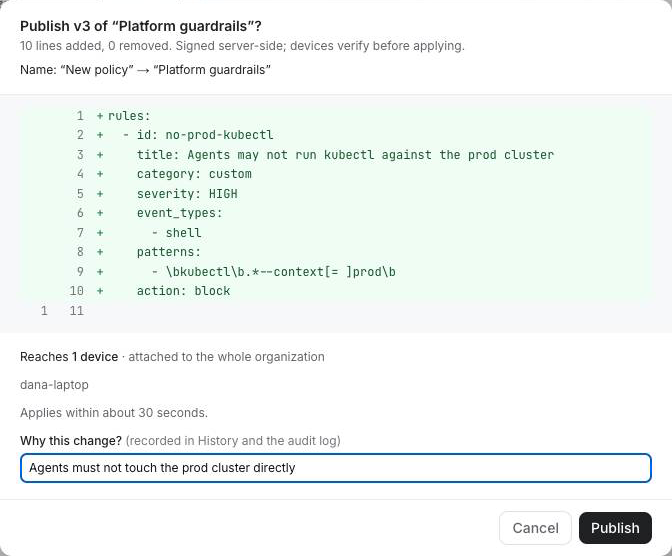
Devices pick up the signed policy within about 30 seconds.
Observe or enforce. A rule made with the form has no mode of its own. It follows the policy's Mode. With Mode left on observe, devices report every match as a would-block and let it run. When you've watched it for a while and trust it, set the policy's Mode to Enforce to start blocking.
4. Confirm the device has it
On an enrolled machine, --explain shows where a rule came from and why it resolves to observe or enforce:
prismor check --explain "kubectl --context prod get pods"
[HIGH] Agents may not run kubectl against the prod cluster  (WARN)
  rule: no-prod-kubectl  evidence: kubectl --context prod get pods
  category: custom  action: block
  defined by: remote policy layer
  mode: observe — policy default_mode: observe  →  reports only
defined by: remote policy layer means it arrived from the console. prismor enroll-status shows which policy version the device is on.
Troubleshooting
| Symptom | Fix |
|---|---|
prismor check passes a command you expected to match | Run prismor check --explain with the exact string. Most misses are an unescaped . or \b lost to YAML double quotes. Use single quotes. |
A test fails with input: '' | Test cases use input:, not value: or command:. |
| The rule shows WARN, not BLOCK | It's running in observe. Add mode: enforce to the rule locally, or set the console policy's Mode to Enforce. |
| The device still has the old version | Policies apply within about 30 seconds. Check prismor enroll-status for the version number. |
Next
- Authoring a Policy:
add_patternsanddisable_patternsfor tuning built-in rules, and the core rules you can't weaken - Attribute conditions:
when:clauses that make a rule depend on who is calling - All guides