Roll out from observe to enforce
Start by watching what your agents do, then turn on blocking for the rules you trust. Make narrow exceptions for the rest.
You'll need
- Prismor hooked into at least one agent. See Enroll a device.
- A few days of agent activity in observe mode, so you know what policy would block.
1. See what would block
In observe mode Prismor records every finding and lets the call through. To ask what a specific command would do, use prismor check:
prismor check "git push --force origin main"
prismor check "rm -rf ~/"
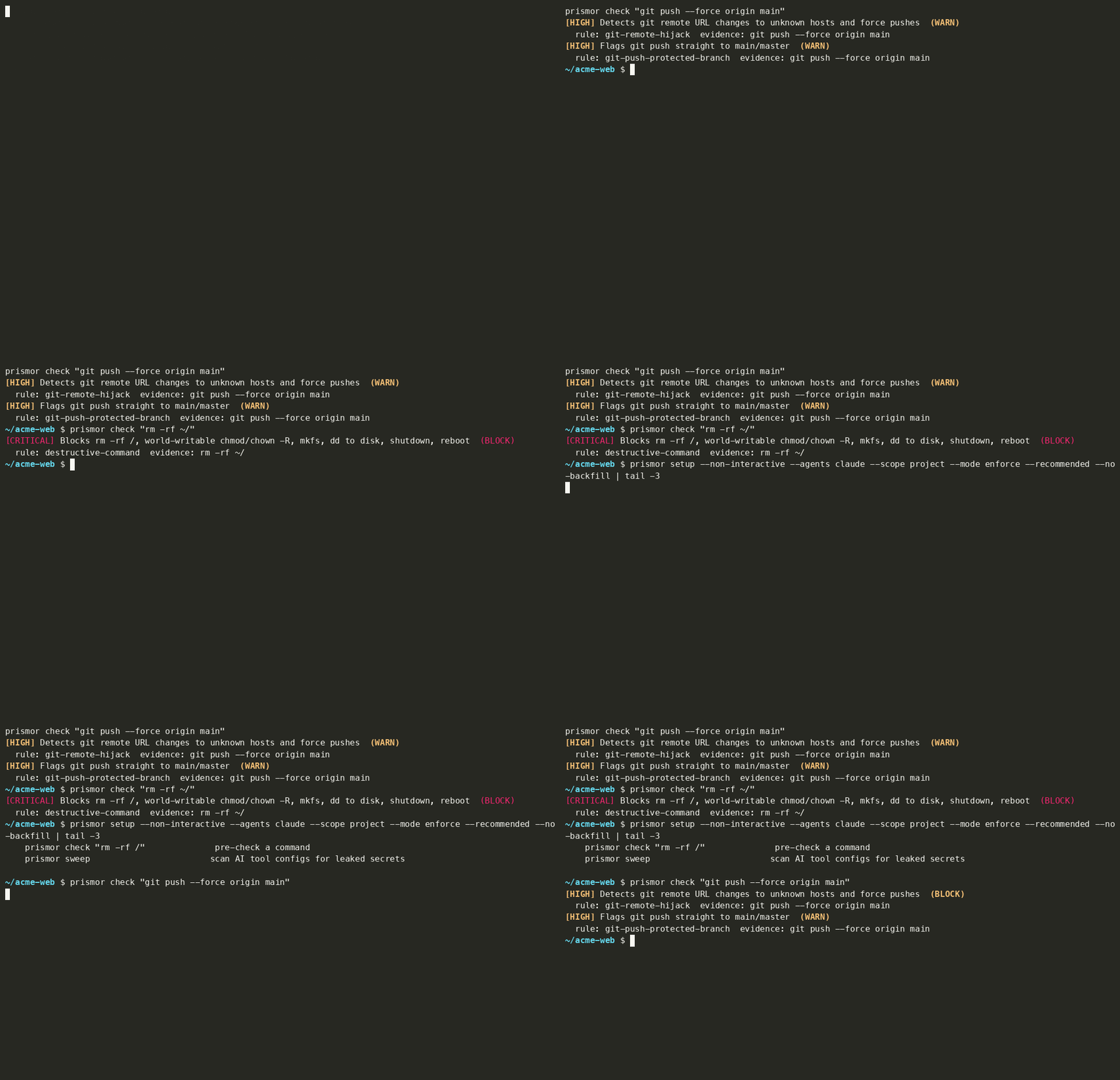
Each finding ends with WARN or BLOCK. Some rules show BLOCK even in observe mode. Those are the safety floor: destructive-command and a few others always block, whatever the mode. Add --explain to see why a rule resolves the way it does:
mode: enforce — safety floor: non-overridable rule id → blocks
The console shows the same picture across all your devices. Sessions → Flagged lists every session with a finding.
2. Turn on enforce
On one machine: re-run setup with the recommended block set:
prismor setup --non-interactive --agents claude --scope project --mode enforce --recommended
--recommended selects the safety floor plus the default blocking categories. To pick rules yourself, pass --enforce-rules rule-a,rule-b, or run prismor setup with no flags for the interactive picker. Your selection is written to .prismor/policy.yaml, one line per rule:
- {id: git-remote-hijack, mode: enforce}
Run the same prismor check again. git push --force now comes back as BLOCK from git-remote-hijack. git-push-protected-branch stays a WARN, because it isn't in the recommended set.
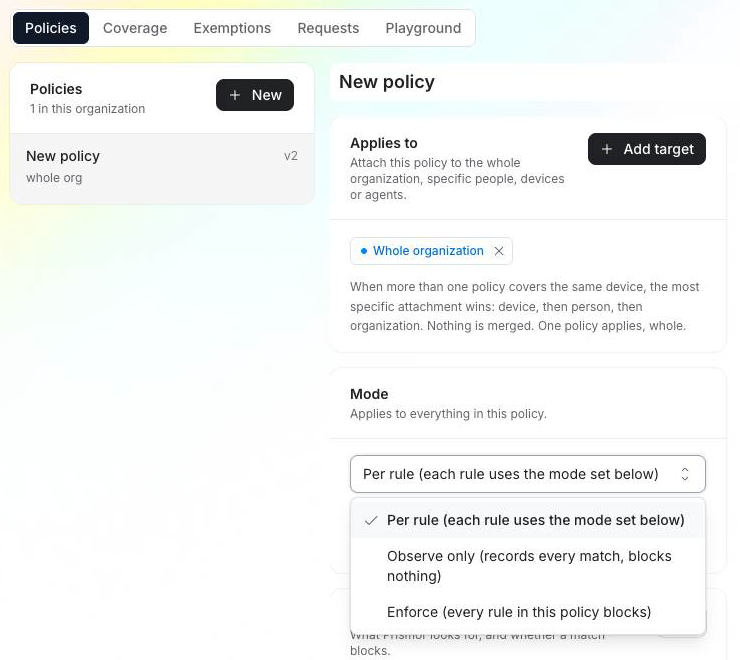
For the whole org: open Policies in the console, pick the policy attached to your org, and set Mode:
| Mode | What it does |
|---|---|
| Per rule | Each rule uses its own mode, set under Detection rules → Edit. The usual way to roll out gradually. |
| Observe only | Records every match and blocks nothing. |
| Enforce | Every rule in this policy blocks. |
Policy changes are signed and reach enrolled devices on their next policy pull, within about 30 seconds. The Kill switch checkbox stops applying the policy entirely. Devices then fall back to whatever else covers them, or to the built-in defaults.
3. Make narrow exceptions
When a rule blocks something legitimate, make the smallest exception that fixes it.
Unenrolled machine: prismor allow adds a scoped, optionally temporary exception to this workspace:
prismor allow git-remote-hijack --pattern "git push --force origin release" --expires 2h --reason "release rebase"
Without --pattern, it allows exactly the text of the last block for that rule. --observe keeps the rule but stops it blocking. --off turns it off in this workspace. prismor allow --list and --undo manage what's there.
Enrolled machine: the org's signed policy owns the workspace, so a local change would be overwritten on the next pull. prismor allow refuses and points you to an admin:
This workspace is managed by your organization — its signed policy would overwrite a local change on the next pull.
Ask an admin instead: prismor exempt request --reason "<why>"
The request appears under Policies → Requests. When an admin approves it, devices apply the change within about 30 seconds. Active exemptions are listed under Policies → Exemptions until they expire or are revoked. Core protections stay on either way.
4. Pause one machine if you need to
On the device's page under Devices, an admin can force a single machine to Force observe or Force enforce. This override wins over every agent and rule mode on that machine, so use it as a temporary kill switch while you investigate. Clear it to return to the normal policy.
Troubleshooting
| Symptom | Fix |
|---|---|
| A rule still blocks in observe mode | It's on the safety floor. Check with prismor check --explain "<cmd>". |
prismor allow says the workspace is managed | Ask an admin with prismor exempt request, or relax the rule in the org policy. |
prismor exempt request says Not a git repo | Exemptions are per repository and need an origin remote. |
| Console change hasn't taken effect | Devices pick up policy within about 30 seconds of their next tool call. Policies → Coverage shows which version each device runs. |
Next
- Authoring a Policy: every rule field and override layer
- Layered Policy & Exemptions
- All guides